Joseph's Tech Talk
|Joseph's Tech Talk

Subscribe

🚨 Scam Alert: Fake Capital One “Payment Received” Email

|
Joseph's Tech Talk

Joseph's Tech Talk

Archives

🚨 Scam Alert: Fake Capital One “Payment Received” Email

🚨 Scam Alert: Fake Capital One “Payment Received” Email
Watch out for phishing emails claiming you must “authenticate a payment.” Do not click links—report and delete immediately.

Joseph Ebneyamin

Oct 6, 2025

🚨 Cybersecurity, Phishing & Scam Alert Newsletter


10/03/2025


What's new this week.

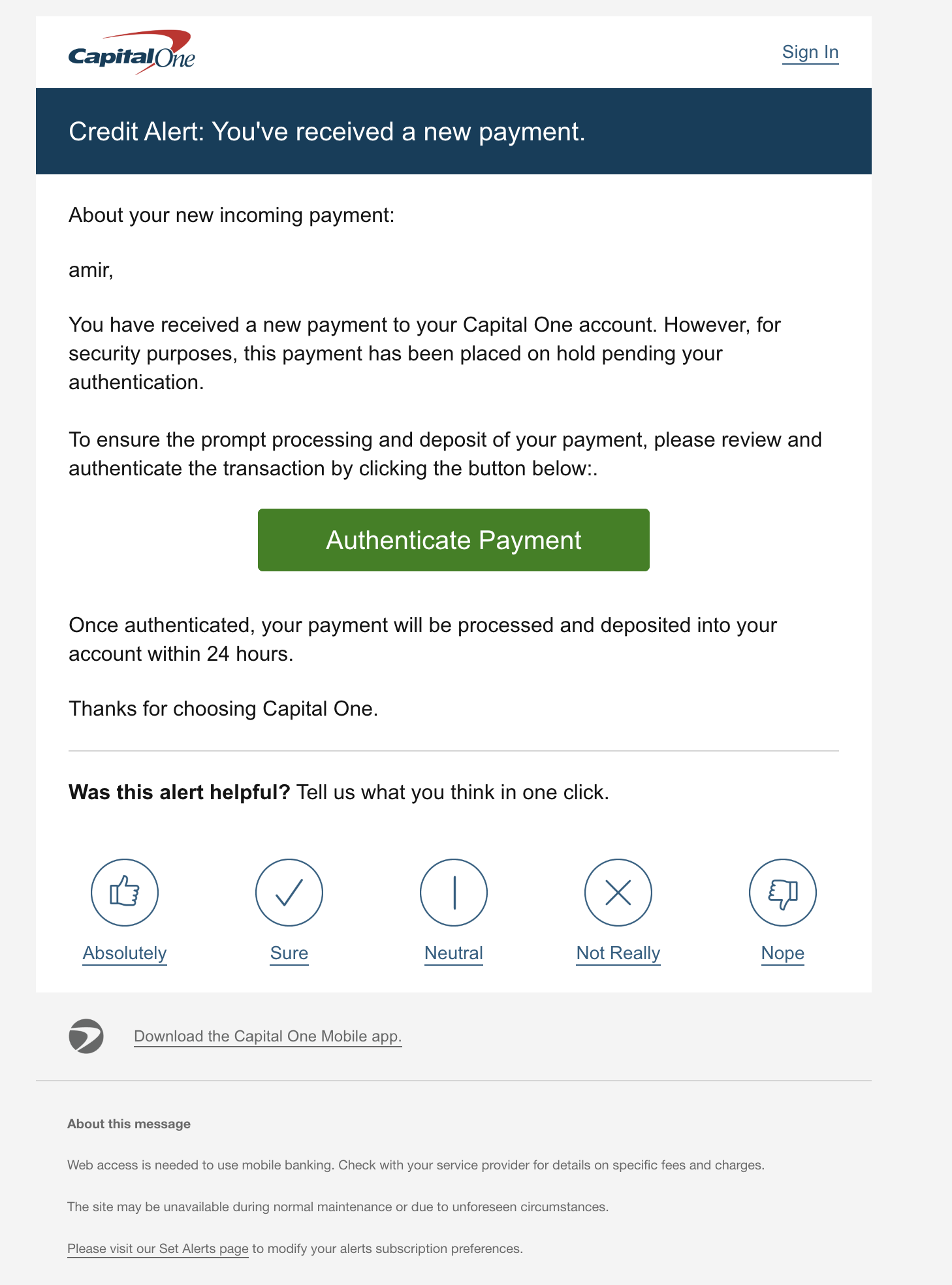
🚨 Scam Alert: This email is a phishing scam and not a legitimate message from Capital One. Here’s why:

🚩 Red Flags in the Email


  1. Generic greeting – It just says “amir,” instead of using your full name as banks normally do.

  2. Urgency and fear tactic – It claims your payment is “on hold” until you Authenticate Payment. Scammers often create urgency so you’ll click without thinking.

  3. Suspicious button – The big green Authenticate Payment button is designed to trick you into clicking. It likely leads to a fake site that steals your login info.

  4. Typos / formatting issues – For example, there’s an extra colon after “clicking the button below:.” Professional institutions rarely send emails with mistakes like this.

  5. Unusual request – Banks do not require you to “authenticate” payments by clicking email links. You normally just see deposits in your account.


✅ What You Should Do


  • Do NOT click any links or buttons in this email.

  • Do NOT reply to it.

  • Report the email by forwarding it to abuse@capitalone.com or reportphishing@apwg.org.

  • Delete it after reporting.

  • If you already clicked or entered details, immediately log into your real Capital One account (by typing capitalone.com directly in your browser) and change your password.

  • Consider enabling two-factor authentication (2FA) for extra protection.

🔒 How to Spot Legit Capital One Emails

  • They will address you by your full legal name, not just “amir.”

  • Legitimate emails never ask you to click a link to “authenticate” or “unlock” deposits.

  • You should always be able to confirm activity by signing in at capitalone.com or through the official Capital One Mobile app.


⚠️ This is a classic phishing attempt — the safest move is to report and delete it.


Joseph's Tech Talk

Category

Link Name

© 2025 Joseph's Tech Talk.


📩 Joseph’s Tech Talk – Your Weekly Tech Digest! 🚀 Welcome to Joseph’s Tech Talk, your go-to weekly newsletter for staying ahead in the tech game! 💡 Whether you're a business owner, or just someone who wants to keep up with the latest Adagio Accounting Software updates, industry-specific business solutions, and email scams alerts, we’ve got you covered. 🔹 Adagio Accounting News – Stay in the loop with updates, tips, and tricks to maximize your software’s potential. 🔹 Business Solutions – Learn how tech can streamline operations and boost efficiency. 🔹 Email Scams & Phishing Alerts – Stay safe online with critical warnings and best practices to avoid scams and protect your data. 🔐 Delivered straight to your inbox every week, we keep things simple, no tech jargon, just practical insights you can use! 📬 👉 Subscribe now and stay tech-savvy! 🚀

© 2025 Joseph's Tech Talk.